Showing posts with label Windows_Server_2012. Show all posts

Tuesday, October 22, 2013

Notify AD User About Password Expiry via email

I had a customer whereby their users are highly mobile, the issue he had is those mobile users often got their account locked due to password expiry policy, and he had to remotely unlock their AD account on weekends and late night, so he ask me for a solution regarding this.

We can resolve the issue by combining PowerShell script with Task Scheduler to automate the task. Here is how to do it:


  1. Download "Password Expiry Email Notification" Powershell script which created by MVP Robert Pearman here
  2. Open the downloaded file via Notepad, modify the smtpServer,from, expireindays field base on your needs and environment configuration.
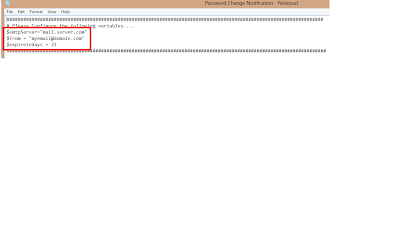
  3. Save it to the desired folder after you have done it.
  4. Launch a Task Scheduler and select "Create a basic task",give it a proper name and description. Click "Next".
  5. On the Trigger field, select "Daily", click "Next".
  6. Determine the start date and time, for example every 9am daily, insert "1" in recur every _ field. Click "Next"
  7. On the Action field, select "Start a program", click "Next"
  8. Insert "powershell -file "C:\scripts\Password Change Notification.ps1", click "Next"
  9. Click Yes on the following dialogue box.
  10. Click "finish" and "OK" to exit the task scheduler.
By doing so, the script will be executed daily 9am and it will send the notification to users that password is going to expire within the defined variable.

Tuesday, August 6, 2013

Slow DNS Query (Event 5501:The DNS server encountered a bad packet from *.*.*.* Packet processing leads beyond packet length. The event data contains the DNS packet.)

I received complaint from one of my customer stating that there were slow DNS query with the new domain controller Windows Server 2012 deployed recently. Upon checking the event viewer I found that event ID 5501 was log:

The DNS server encountered a bad packet from *.*.*.* Packet processing leads beyond packet length. The event data contains the DNS packet.


Resolution:

Open CMD (run as administrator), type below command and hit enter:

dnscmd /config /enableednsprobes 0

After restating the DNS service, the DNS query works like a champ.


Saturday, July 20, 2013

Windows Server 2012 Hyper-V - Disk Error Read Only

I was working on one project that ran into a small issue, when I try to save a VM into the SAN, "Disk Error Read Only" appears. I resolve this issue by running:

1. open "CMD"
2. type "diskpart"
3. list disk (determine the correct disk that having the issue)
4. select disk 1 (for example disk 1 is the one that causing the issue)
5. attributes disk (list the attributes of disk 1)
6. attributes disk clear randomly (set the randomly attribute to no)
7. attributes disk (display the new result after step no.6)
8. exit